I first got to know and love REI back in college when I was an outdoor recreation guide taking folks on canoeing, kayaking, camping and rock climbing trips.
Even back then, REI was this place where you could (and did) get anything and everything to take care of your outdoors needs. I spent enough money at the REI in San Diego, that I ultimately wound up working there (in the summer of 1990) first off because it was a great environment to spend my daylight hours talking to folks about the very equipment I used extensively on my days away from REI, but more importantly, because I got to participate in "pro deals" where employees could get the equipment at dramatically reduced prices. Heck, I think I actually bought more stuff from REI that summer than I wound up earning. Come to think of it, I believe that was the summer I began to carry the credit card debt that I wouldn't full break out from underneath until 8 years later when I hit the AOL options lottery.
Now flash forward 18 years to where I'm the customer wandering the aisles asking REI staff for recommendations on this, that and the other. When I did my Mt Whitney summit last year, it was the kind folks at REI who helped me pick out an updated pair of hiking boots to replace my 25 year-old Vasques. Of course, the REI folks helped me slide into a new pair of Vasque Switchback GTX boots (less than half the weight of my old pair, whew!), and all indications were that the boots were a perfect fit. At $150 for the pair, they should have been.
But they weren't the perfect fit. After I got back from climbing to the top of Mt Whitney (and back down again) in them, I lost the nails on both my second toes (next to the big toe), and my left big toe is still slowly growing out of its bruised nail these six months post-summit.
Now, it wasn't just my toes that took a beating on the summit run. The boots took a beating during my warm-up hikes around the Bay Area and up at Squaw Valley, and then up and down Whitney itself. Given all those miles (and the mounted crampons), you can imagine the scuff marks on the outside of the boots after all that.
So, what am I to do with a relatively new, yet still visibly worn, pair of boots that don't fit? Especially given I'm going up Mt Whitney again in three months? Well, thanks to REI's 100% satisfaction guarantee, I just take them back to REI, tell them I got the wrong size and I get credited my money back to buy another pair (they're now $160).
I was more than prepared to pay some kind of idiot tax for buying boots too small, but not to the extent of having to eat the entire cost of the boots.
REI's forgiven my mistake and retained me as a customer for life.
I wonder if I can get a pro deal on my next pair of boots?
Showing posts with label customer support. Show all posts
Showing posts with label customer support. Show all posts
Friday, March 28, 2008


Thursday, March 13, 2008
VZW.com support team says "we don't support Macs"

My jaw is still agape at the brush-off I just got from the customer support folks (specifically: B) at VerizonWireless.com when I called to report that the "View Paper Bill" button wasn't working from Firefox, Flock or Safari on my Mac.
"I'm sorry, sir, we don't support Macs."
I'm floored at this attempt to brush me off for the kind of computer I'm using. It's one of those disrespectful "shoo fly, don't bother me" knee-jerks reactions I get from someone employed as a customer support rep yet not really wanting to do her job.
I press on: I've been using vzw.com functionality from my Mac for the last several years, when did you stop supporting mac access?
"If you like, I can confirm that for you"
Confirm what? that you don't support Macs? or that the View Paper Bill button doesn't work?
"That we don't support Macs"
But that doesn't solve my problem: I want to be able to print out a copy of my bill to submit for reimbursement. Can you tell me how to get view my paper bill?
"Hold please"
B goes away and then comes back and tells me I need to remove all my cookies and log in again, then click the button (she can make it work from her Internet Explorer browser with no problems).
I erase my cookies, log in again, navigate to the button and click it.
I can even see where the button action is in the page source :
<button type="button" class="gray" onclick="getPDF('REDACTED','February 25, 2008'); _hbSet('c2', 'REDACTED' ); _hbSet('cv.c5', '4087617021' ); _hbPageView(_hbxStrip('billing options statement view paper bill'), _hbxStrip('/my account/overview/billing options'));" >VIEW PAPER BILL</button>
Still no response when I try to click it, again.
"It should start downloading a PDF... do you have Adobe Acrobat Reader installed?"
I know how this works. For the last four years, I've been able to do this specific action once a month... that's almost 50 times running. Let's get to the point: please file a trouble ticket for me.
So the ticket starts to get filled out. It's obvious from the questions B's asking and her pauses and nonreactions to the information I'm asking her to include (last time I successfully used the function, my ability to recreate the error, the line of code on the page where the trouble's coming from, etc), this trouble ticket isn't designed to actually help the customer.
I'm assured I'll get a call back in three to five days. Business days or calendar days?
"I said three to five days."
I say I need to find a PC to tackle this particular problem. And I'm tempted to go back to receiving paper bills just to add to the overhead of supporting my account.
Sunday, December 23, 2007
Maytag refrigerator repair: holiday surprise
Our Maytag Ice 2 O regrigerator (model MFI-2568-AES) went on the fritz last Wednesday night around 8:30pm. Thanks to the Web, ComplaintBoards.com and Forbes Appliance Repair, we had the fridge fixed (for free) within 24 hours... what a surprise!
To set the stage appropriately, we like our refrigerator a lot: it's got french doors, a bottom freezer drawer and an in-the-door console with ice and water dispenser. We bought it off the floor of Lowe's when we moved to Redwood City in July 2006, and it's served us well, for the most part.
So when this thing went "on the fritz," I mean the lights on the control panel started flickering in a Close-Encounters-of-the-Third-Kind fashion while the flap on the ice cube dispenser methodically opened and slammed shut. What kind of pissed off kitchen gremlin had decided to take up residence in our 16-months-new fully stocked fridge the week before Christmas?
Left Coast Mom and I began searching for the owner's manual to try and troubleshoot the situation (in the index under "P" for "Possessed") but couldn't find the manual anywhere in the kitchen or the files or the storage room bookcases (later we'd find out we'd stored it conveniently on top of the fridge in case something malfunctioned). So, we took to the web in search of help on our dueling laptops.
I found the owners manual online at the maytag web site and 58 Mb of file download later, I found nothing in the manual that was any help beyond how to turn off power to the control panel (remove the cover over the door hinge above the panel, then unplug the wire harness) to stop the infernal dispenser racket. We were out of warranty, and I was desperately scanning the web for any information on how our problem could be fixed and how much it'd cost us.
So I googled "maytag MFI-2568-AES troubleshoot" and about half-way down the results list I discovered the ComplaintsBoard forum overflowing with posts from folks (like us) who were confronted by malfunctioning control panel/ice dispenser. I found nine pages of forum posts, to be precise, starting Feb 9, 2007, when Cheryl M posted the following:
Thursday morning, I got a hold of Lorraine at Whirlpool and reported my problem. Within 10 minutes, she'd issued me a QI code and offered to set up a service call for me with A&E Factory Service the day after Christmas (6 days later!). I declined the offer and instead tried to go with a local shop, leaving a message with Forbes Appliance Repair here in Redwood City.
Bill (at Forbes) called me back around 3pm to get more details. I told him the problem and he admitted he probably didn't have the part in stock and couldn't get it until after the holiday.
I tried calling A&E myself to see if I could get a Friday appointment since I assumed they'd have the part in stock. Within 2 minutes of dealing with the customer support rep at A&E, I'd learned enough to know I was dealing with the demon variety and decided to stay with my instincts to go local.
I called Bill back and asked that he order the part and come install it. Bill took my info and was surprised when I gave him the part number he'd need to order (I had it thanks to the forum posts). He said he'd put in the order and would call to let me know when it was due to come in so he could come replace it.
Within 30 minutes, Bill called back with an unexpected question: "When can you be at the house?"
Beg pardon?
Bill happened to have the part in stock and offered to come to the house to install it that evening. All I had to do was move the fridge away from the wall so he could access the panel in the back to replace the board. (In moving the fridge, I discovered where we'd stashed the manual.)
At 6:15p, Bill knocked on the door. By 6:30p, the fridge was fixed and Bill was packing up his stuff and wishing us a Happy Holiday.
Happy Holidays, indeed. So refreshing to get good customer service from a local provider.
So, thanks to Forbes Appliance Service (650-366-8388) here in Redwood City, our fridge was fixed in record time. Here's hoping your appliances never go on the fritz, but if they do, give Bill a call to come fix them.
To set the stage appropriately, we like our refrigerator a lot: it's got french doors, a bottom freezer drawer and an in-the-door console with ice and water dispenser. We bought it off the floor of Lowe's when we moved to Redwood City in July 2006, and it's served us well, for the most part.
So when this thing went "on the fritz," I mean the lights on the control panel started flickering in a Close-Encounters-of-the-Third-Kind fashion while the flap on the ice cube dispenser methodically opened and slammed shut. What kind of pissed off kitchen gremlin had decided to take up residence in our 16-months-new fully stocked fridge the week before Christmas?
Left Coast Mom and I began searching for the owner's manual to try and troubleshoot the situation (in the index under "P" for "Possessed") but couldn't find the manual anywhere in the kitchen or the files or the storage room bookcases (later we'd find out we'd stored it conveniently on top of the fridge in case something malfunctioned). So, we took to the web in search of help on our dueling laptops.
I found the owners manual online at the maytag web site and 58 Mb of file download later, I found nothing in the manual that was any help beyond how to turn off power to the control panel (remove the cover over the door hinge above the panel, then unplug the wire harness) to stop the infernal dispenser racket. We were out of warranty, and I was desperately scanning the web for any information on how our problem could be fixed and how much it'd cost us.
So I googled "maytag MFI-2568-AES troubleshoot" and about half-way down the results list I discovered the ComplaintsBoard forum overflowing with posts from folks (like us) who were confronted by malfunctioning control panel/ice dispenser. I found nine pages of forum posts, to be precise, starting Feb 9, 2007, when Cheryl M posted the following:
I bought my maytag ice2o French door refrigerator from home depot 8 mos ago. Loved it when I got it, but soon after had problems with the ice maker. They replaced the ice maker. Now the ice maker is still having problems. Its not strong enough to break up all the ice. The ice cubes freeze in big blocks causing the system to clog. Last night the thing took on a mind of its own. All the lights are flashing on the control panel, the ice and water maker don't work at all. The flap is constantly opening and closing all on its own, constantly making a clicking noise all night long. Finally we had to unplug it so we could get 4 hours sleep. Plug it in this morning and its still doing it. My biggest concern is what happens after the warranty runs out. I already know this thing has mechanical problems. Did I get a lemon or is it junk?? Either way I'm stuck with a $2,800 refrigerator that seems like it has bad engineering.It was great to follow the arc of the discussion going from first post to group-wide resolution:
- In the first 60 days, a dozen folks chimed in to say they were affected by the same problem.
- Within 90 days, the forum was picking up speed and the group had diagnosed the High Voltage Control Board (part # 12920710 Board HV C) as the culprit. At least one workaround had been posted to the $200-$400 "official" fix for those of us out of warranty.
- On Day 133, the first "we're investigating a potential class action suit" post appears.
- By Day 150, folks begin posting success with Maytag's fixing the units for free and the discussion turns to strategies for navigating the customer service phone tree.
- By Day 180, the complaints are now focused on the repair services, not on Maytag. From the posts, it seems A&E Factory Service is either heaven-sent or demons-from-hell depending on which city you live.
- By Day 210, the forum is mostly full of folks expressing gratitude for all the previous posts and tips and reporting success in getting their own fridges fixed.
Thursday morning, I got a hold of Lorraine at Whirlpool and reported my problem. Within 10 minutes, she'd issued me a QI code and offered to set up a service call for me with A&E Factory Service the day after Christmas (6 days later!). I declined the offer and instead tried to go with a local shop, leaving a message with Forbes Appliance Repair here in Redwood City.
Bill (at Forbes) called me back around 3pm to get more details. I told him the problem and he admitted he probably didn't have the part in stock and couldn't get it until after the holiday.
I tried calling A&E myself to see if I could get a Friday appointment since I assumed they'd have the part in stock. Within 2 minutes of dealing with the customer support rep at A&E, I'd learned enough to know I was dealing with the demon variety and decided to stay with my instincts to go local.
I called Bill back and asked that he order the part and come install it. Bill took my info and was surprised when I gave him the part number he'd need to order (I had it thanks to the forum posts). He said he'd put in the order and would call to let me know when it was due to come in so he could come replace it.
Within 30 minutes, Bill called back with an unexpected question: "When can you be at the house?"
Beg pardon?
Bill happened to have the part in stock and offered to come to the house to install it that evening. All I had to do was move the fridge away from the wall so he could access the panel in the back to replace the board. (In moving the fridge, I discovered where we'd stashed the manual.)
At 6:15p, Bill knocked on the door. By 6:30p, the fridge was fixed and Bill was packing up his stuff and wishing us a Happy Holiday.
Happy Holidays, indeed. So refreshing to get good customer service from a local provider.
So, thanks to Forbes Appliance Service (650-366-8388) here in Redwood City, our fridge was fixed in record time. Here's hoping your appliances never go on the fritz, but if they do, give Bill a call to come fix them.
Thursday, September 13, 2007
comcastic indeed, redux
Thanks to my friend Lisa, I've had a schadenfreude morning reading about Bob Garfield's experience as yet another displeased Comcast (soon-to-be-ex?) customer.
I like the way he's ended his post with a call to action:
While my lousy experience trying to LEAVE Comcast ultimately was resolved by my throwing up a white flag, Bob's been burned by Comcast's lack of customer support trying to BECOME a customer.
I like the way he's ended his post with a call to action:
In any event, the damage has been done. They have ruined two weekends and screwed up half of my telecom services. I will shake them down for as much free service as I can get, then drop them at the first opportunity. And they deserve it. They deserve much worse.Is this company so frantic to seize market share on voice and broadband that it is willing to disrupt customers' lives, fail to appear, repeatedly lie to them, walk out on them and then treat the customer as if he or she is a nuisance?Well, we shall see. This is the Listenomics age. We will not take it quietly.
And by the 49 comments (and counting) left so far, it looks like folks are not staying quiet.
Thursday, August 16, 2007
preparing to leave Verizon Wireless
I've been a Verizon Wireless customer since shortly after the company
came on the scene in 2000 (out of the merger of Vodafone and Bell
Atlantic). The first five years of service were actually quite good,
as I found VZW had rather decent coverage for my cell phone and the
rates were competitive. I even stayed with Verizon Wireless when I
switched coasts in 2003, moving out west to California and swapping
my 703 number to a 408 number.
came on the scene in 2000 (out of the merger of Vodafone and Bell
Atlantic). The first five years of service were actually quite good,
as I found VZW had rather decent coverage for my cell phone and the
rates were competitive. I even stayed with Verizon Wireless when I
switched coasts in 2003, moving out west to California and swapping
my 703 number to a 408 number.
Then, in 2005, I upgraded my handset to a Treo 650 to take advantage
of the data capabilities of the Treo, and my relationship began to sour.
As a VZW subscriber, my Treo's feature set was crippled as a matter
of corporate practice. How did this manifest itself to grate at my
nerves most? I have BMW Assist in my car with Bluetooth technology.
Theoretically, I can pair the Treo with the car to be able to use the
car's built-in hands-free (steering wheel embedded) communications
system. I say theoretically because VZW saw fit to disable this
feature on the Treo so if I try to make a call via my car, the phone
reboots as soon as the other party picks up. If I had my Treo on the
Cingular or Sprint networks, it'd work just fine. It's just that VZW
has decided to cripple this feature. This is purely a VZW issue (even
though they insist it's a BMW thing).
Biggest bummer: I got my car a month after getting the phone and was
locked in a phone contract for another 23 months.
Flash forward to today and I'm free of the contract. As I wade into
the tar pit that is cellular calling plans and equipment choices, I'm
willing to give VZW one last chance to keep me (and my wife) as a
customer. I find the Blackberry 8830 equipment on the VZW web site
and spend a lot of time trying to figure out if the Bluetooth is
compatible with my car. No info available.
I drive over to the nearest VZW storefront and fondle the 8830
(nice!) and think, you know, I could re-enlist in the Verizon
trenches if this thing'll work in concert with my car.
I approach the customer service rep at the store and ask about the
8830 and its compatibility with a 2005 325i. The kid is too quick to
say "of course it'll work... it's got Bluetooth!" I push him a little
bit and ask for the product documentation showing that the link
hasn't been disabled (I've been down this road before). He tells me
to go talk to the BMW folks.
I tell him goodbye.
I'm finally ready to leave Verizon Wireless. Good riddance.
Wednesday, August 08, 2007
DirecTV Ka-Lo band up-conversion process suggestions
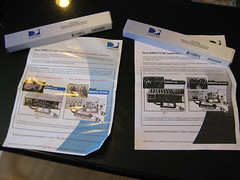 And just as I thought DirecTV was getting less geeky in their approach to dealing with their HD DVR customers, this new Ka-Lo band up-conversion process comes to bear.
As a DirecTV HR20 HD DVR owner, here's my up-conversion experience and some suggestions for the DirecTV folks on how to make it better (should they care) next time around.
First Encounter: I'm sent an email with subject line "Important Information about your HD Equipment" in which I'm invited to go to a web page to figure out if I've already got the B-Band Converter (BBC) module installed in my machine.
Better approach: DirecTV already tracks my equipment, my viewing habits, my programming... they should already know whether I've got the BBC modules or not. Send me an email to tell me the required modules are being shipped to me (and why) unless I opt out.
Second Encounter: A system message delivered to the inbox of my HR20 telling me to go visit the directv.com/bbc web page to see if I need to order the BBC modules for HD programming.
Better approach: Send a ping through the system to see if my BBC modules are installed (you can do that, too, right?). If not, give me a system message that says the modules are being mailed to me and to call DirecTV if I haven't received them by X date.
Third Encounter: As seen in the picture at the top of the post, the (two) modules arrive in separate padded envelopes (oh, the cost savings!) FedEx'd to my home. Each envelope contains a box containing one module and one single-page instruction sheet. The instruction sheet seems pretty straight forward: Thanks for ordering, installing is easy, pretty explanatory pictures and a copyright notice.
Upon opening the box and sliding the module out, however, my inner geek goes wild and my "I'm just a dumb customer" side barfs on the table. Included with the module is a two-color, double-sided page of instructions from the manufacturer of the module, Zinwell, whose brand is directly under the bolded, big-texted title of the Instructions sheet (no copyright notice on this puppy, thus the repost):
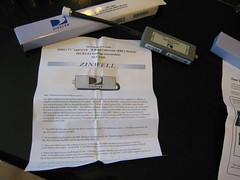
Installation Guide
DIRECTV Approved "B Band Converter (BBC) Module"
(for Ka-Lo band up-conversion)
SUP-2400
DIRECTV Approved "B Band Converter (BBC) Module"
(for Ka-Lo band up-conversion)
SUP-2400
And then the getting gets good with the introductory paragraph that includes the BBC Module Functional Description:
The BBC Module is to be used in conjuction with the Ka/Ku Out-Door Unit (ODU) and the A3/MPEG-4 capable satellite receiver, hereafter to be called "the IRD". The Ka/Ku ODU output will consist of a three-way stacked signal: a Ka Lo-band (B Band) at 250-750 MHz, a Ku band at 950-1450 MHz and a Ka Hi-band (A Band) at 1650-2150 MHz. The IRD has an input range of 950-2150 MHz so an up-converter must be used in order to access the 250-750 MHz spectrum. Failure to install a BBC Module at the back of the IRD prevents the IRD from receiving Ka Lo-band. For clarity, a BBC Module must be used with each A3/MPEG-4 capable IRD in the home system. As further clarification, a BBC Module must never be used in a system that contains an Frequency Translation Module (FTM) as the equivalent function is already contained in the FTM.WTF is an FTM and how can I tell I don't already have it, thus rendering the BBC module moot? Why must the BBC "never" be used in a system with FTM? so much FUD, so little time.
And still a page and a half of tech directions and illustrations I won't bore you with here (still with me?)
Better approach: Get the vendor to leave the technogeek screed out of the module box. Catch pre-shipping the fact I need two and send them both in the same envelope. Include the simple picture-laden how-to single pager and include a bright yellow postcard that says "If you do not install these modules, you risk losing your HD channel access." Done.
Boy, these new HD channels I'm about to get (now that I've successfully completed the DirecTV Ka-Lo band up-conversion process) better be good.
Tuesday, August 07, 2007
making a coleman lantern work
Back in May of this year, I found a screaming deal on Amazon.com to purchase a Coleman Lantern . In the same order, I picked up a Eureka tent as well as a Coleman stove. I was planning ahead for taking my family camping in the summer, so when the stuff arrived, I just put the unopened cartons in our storage room without opening them up. Why bother since we wouldn't use them for at least a couple months?
Oops, wrong move.
When it came time to actually get ready to go camping (in July), I pulled out my tent, stove and lantern to give them a test run before putting them through their paces at the camp site.
Smart move.
The tent and stove worked just fine.
It was the lantern that gave me fits. I've used plenty of Coleman lanterns before, so I know how they work. This one, however, just didn't stay lit no matter how much pressure I pumped into the damn thing.
I'd pump pump pump (30 times) and then open the valve and apply a flame. The mantles would glow for about 10 seconds and then pulse before going out. WTF?
I tried burning in another set of mantles. No luck.
I couldn't return the lantern to Amazon as defective because I'd waited over two months to try the damn thing out. I was stuck with it. The screaming deal was looking less than money-saving at this point.
I took the lantern over to our local REI to see if the experts there could help me understand what, exactly, was wrong with the lantern. Again, no luck. They tried to make it work and got the same result (10 seconds of light, then pulsing, then nothing) and suggested I might want to "tinker" with the regulator.
A tinkerer I am not, so I went to the Coleman web site to find the local authorized warranty repair place which turned out to be a place called Traders in San Leandro, a good 30 miles and a toll bridge crossing away from us in Redwood City. Believe it or not, there's no other warranty place in the Bay Area. Thankfully, the lantern has a five-year warranty, so I screwed up my courage and took the lantern over to get it fixed.
The guys at Traders were nice enough. They took the lantern, listened to my story, gave me a claim check and told me it'd take about 10 days to fix.
Flash forward to yesterday and I called Traders to see if the lantern was ready. Indeed, it was. Could they please tell me what was wrong with it?
After a short pause, I was asked, "did you take any fuel out before bringing it in?"
"No."
"Well, I ask because I filled it up with more fuel and it's worked fine for me every time I lit it."
"So, there was nothing wrong with the lantern. It was really my not filling it up with enough fuel."
Another pause. "It seems that might have been the problem, yes."
"Wow. Color me embarassed. I'll be by this week to pick it up."
"Come on over when you get a chance!"
So today, I made the drive of shame over to Traders to pick up my perfectly functioning (and now full of gas) Coleman lantern. I timed my visit to coincide with the repairman's lunch break, so I didn't actually have to meet him face to face. The guy at the counter just saw the big "NO CHARGE" stamp on the invoice and let me walk out the door with it.
And tonight, when I tried lighting the lantern on the deck, wouldn't you know it works just fine.
So, two lessons learned on this camping purchase:
1. when you buy stuff from Amazon, make sure it works as soon as it's delivered. If you wait too long, there's no recourse should something (seem to) go wrong.
2. if it takes fuel, fill it up all the way before trying to make it work.
Don't repeat my mistakes!
. In the same order, I picked up a Eureka tent as well as a Coleman stove. I was planning ahead for taking my family camping in the summer, so when the stuff arrived, I just put the unopened cartons in our storage room without opening them up. Why bother since we wouldn't use them for at least a couple months?Oops, wrong move.
When it came time to actually get ready to go camping (in July), I pulled out my tent, stove and lantern to give them a test run before putting them through their paces at the camp site.
Smart move.
The tent and stove worked just fine.
It was the lantern that gave me fits. I've used plenty of Coleman lanterns before, so I know how they work. This one, however, just didn't stay lit no matter how much pressure I pumped into the damn thing.
I'd pump pump pump (30 times) and then open the valve and apply a flame. The mantles would glow for about 10 seconds and then pulse before going out. WTF?
I tried burning in another set of mantles. No luck.
I couldn't return the lantern to Amazon as defective because I'd waited over two months to try the damn thing out. I was stuck with it. The screaming deal was looking less than money-saving at this point.
I took the lantern over to our local REI to see if the experts there could help me understand what, exactly, was wrong with the lantern. Again, no luck. They tried to make it work and got the same result (10 seconds of light, then pulsing, then nothing) and suggested I might want to "tinker" with the regulator.
A tinkerer I am not, so I went to the Coleman web site to find the local authorized warranty repair place which turned out to be a place called Traders in San Leandro, a good 30 miles and a toll bridge crossing away from us in Redwood City. Believe it or not, there's no other warranty place in the Bay Area. Thankfully, the lantern has a five-year warranty, so I screwed up my courage and took the lantern over to get it fixed.
The guys at Traders were nice enough. They took the lantern, listened to my story, gave me a claim check and told me it'd take about 10 days to fix.
Flash forward to yesterday and I called Traders to see if the lantern was ready. Indeed, it was. Could they please tell me what was wrong with it?
After a short pause, I was asked, "did you take any fuel out before bringing it in?"
"No."
"Well, I ask because I filled it up with more fuel and it's worked fine for me every time I lit it."
"So, there was nothing wrong with the lantern. It was really my not filling it up with enough fuel."
Another pause. "It seems that might have been the problem, yes."
"Wow. Color me embarassed. I'll be by this week to pick it up."
"Come on over when you get a chance!"
So today, I made the drive of shame over to Traders to pick up my perfectly functioning (and now full of gas) Coleman lantern. I timed my visit to coincide with the repairman's lunch break, so I didn't actually have to meet him face to face. The guy at the counter just saw the big "NO CHARGE" stamp on the invoice and let me walk out the door with it.
And tonight, when I tried lighting the lantern on the deck, wouldn't you know it works just fine.
So, two lessons learned on this camping purchase:
1. when you buy stuff from Amazon, make sure it works as soon as it's delivered. If you wait too long, there's no recourse should something (seem to) go wrong.
2. if it takes fuel, fill it up all the way before trying to make it work.
Don't repeat my mistakes!
Tuesday, June 19, 2007
our special netflix membership program
For the first time I can remember, we've finally hit our quota in the number of Netflix DVDs we can have in any given month.
Why's this a blog-worthy event? Well, for giggles, I decided to see how long we have to wait before starting a new month (June 26) and how much it'd cost to be on the 2 at-a-time (unlimited) plan.
I follow the convenient embedded hyperlink to the Change Membership page and see this friendly notice at the bottom:
Please Note: You are currently on a special membership program.
Sure enough, as I scan the membership selections (who the heck has time for 8 at-a-time?), there's no such thing as a 2 at-a-time (4 a month) plan to be seen for my rate of $11.99 a month. I can pay $3 more to lift the monthly limit or $2 less to get 1 at-a-time unlimited.
It's not too much to brag about, as we're on the 2 at-a-time (4 a month) plan, but if you knew our viewing habits, you'd be impressed that it's taken this long since we joined Netflix back in November 2004.
Why's this a blog-worthy event? Well, for giggles, I decided to see how long we have to wait before starting a new month (June 26) and how much it'd cost to be on the 2 at-a-time (unlimited) plan.
I follow the convenient embedded hyperlink to the Change Membership page and see this friendly notice at the bottom:
Please Note: You are currently on a special membership program.
If you change your membership, you will lose this special program.
Sure enough, as I scan the membership selections (who the heck has time for 8 at-a-time?), there's no such thing as a 2 at-a-time (4 a month) plan to be seen for my rate of $11.99 a month. I can pay $3 more to lift the monthly limit or $2 less to get 1 at-a-time unlimited.
I kinda like my inexpensive, yet special, status. So for now, at least, I'll keep what I've got.
Monday, June 11, 2007
airline lost our child's car seat
The kicker on our trip home from Seattle last night was the fact that two of our three pieces made it to SFO with us, just fine.
The missing (crucial) piece of luggage that didn't show up was the car seat for our youngest. I'd been keeping an eye on the odd-size luggage window which is where the car seats are usually delivered, but no luck there. So, after watching the both the odd-size window open and close and the luggage carousel spin for 45 minutes AFTER we'd taken our first two bags off, it was clear no more pieces were coming through. Finally, it was time to make the fateful trip to the baggage claim agents to inquire what was up.
I was able to narrow down which of the bar code claim tickets belonged to the car seat and handed it over to the agent asking for an update on the status of my kid's checked car seat.
"Oh, this didn't even scan," said the agent, looking back and forth between the ticket and her computer screen.
Translation: it didn't even make it INTO the system at SeaTac, so no way it was going to arrive at SFO that night. She apologized for the inconvenience while handing me a form and a pen.
While I was filling out the United Airlines Delayed Baggage Report form, the agent disappeared into a side office.
Then the amazing thing happened: she re-emerged with a brand new Even-Flo car seat for us to use until United was able to find our missing car seat and deliver it to us. We'd simply hand over the loaner when our own was delivered.
Call me a cynic, but I'd fully expected a shoulder shrug and apology, not a replacement seat. So, what could have been a really bad experience turned out to be a redemptive customer service exchange. Nice touch.
Oh, and her final tip for me: don't bother calling the 800-number on the back of the Delayed Baggage Report... call the United Premier Exec dedicated customer support line instead.
The missing (crucial) piece of luggage that didn't show up was the car seat for our youngest. I'd been keeping an eye on the odd-size luggage window which is where the car seats are usually delivered, but no luck there. So, after watching the both the odd-size window open and close and the luggage carousel spin for 45 minutes AFTER we'd taken our first two bags off, it was clear no more pieces were coming through. Finally, it was time to make the fateful trip to the baggage claim agents to inquire what was up.
I was able to narrow down which of the bar code claim tickets belonged to the car seat and handed it over to the agent asking for an update on the status of my kid's checked car seat.
"Oh, this didn't even scan," said the agent, looking back and forth between the ticket and her computer screen.
Translation: it didn't even make it INTO the system at SeaTac, so no way it was going to arrive at SFO that night. She apologized for the inconvenience while handing me a form and a pen.
While I was filling out the United Airlines Delayed Baggage Report form, the agent disappeared into a side office.
Then the amazing thing happened: she re-emerged with a brand new Even-Flo car seat for us to use until United was able to find our missing car seat and deliver it to us. We'd simply hand over the loaner when our own was delivered.
Call me a cynic, but I'd fully expected a shoulder shrug and apology, not a replacement seat. So, what could have been a really bad experience turned out to be a redemptive customer service exchange. Nice touch.
Oh, and her final tip for me: don't bother calling the 800-number on the back of the Delayed Baggage Report... call the United Premier Exec dedicated customer support line instead.
Traveling thru SeaTac (boo Hertz)
Couple random observations about traveling through SeaTac this past weekend:
- Always, ALWAYS check for car rental contract before driving away. I've got Hertz Gold, so I can go straight to my car. Did so this time and noticed the contract wasn't there. Spent 5 minutes in the Hertz VIP lounge with several other folks in the same boat. Time well spent, as when we drove out of the rental car garage (and into the rain) to the gate where you show license and contract, there were several cars pulled over to the side with flashers on. I overheard one of the gate agents comment "none of them got their contracts, call those Hertz [folks] and get them out here now!" The agent didn't say "folks" but you get the idea.
- When Hertz says "Green class" and offers you a Toyota Camry, it is NOT the Camry hybrid. I fell for the marketing (and paid $3 a day extra for the privilege), and the extra room in the car was worth it, but if you think you're going hybrid in Hertz's Green Class, save your money.
- Pulling into the Hertz car return 36 hours after leaving, the three folks working the return lanes simultaneously gestured for me to get into three separate lanes. I finally picked the one closest to where I wanted to go and stopped the car. The return agents then bickered at each other in a language I couldn't understand until finally one of them started checking out the car for damage. I'm not one for hand-holding at car-return, but a simple "Hi, how was the car, sorry we were confusing you," would go a long way.
- If you buy fish at Pike Place Market thinking you can carry it on the plane, be warned that TSA is under strict orders to confiscate your ice. Yes, you read that right. We spent an extra 1o minutes at security as the agent struggled to open our odorless cooler to extract two small ice blocks from within. Given there are no pointy objects available at the checkpoint (they must be discarded prior to screening), it was amusing to watch the guy struggle to get thru the packing tap. No, I wasn't about to volunteer my car key to help, for fear of getting the key confiscated as a potentially deadly weapon, too. The whole remove-the-ice trick was security theater at its finest, and I'm glad our flight was short enough that the prized package of Copper River Salmon filets didn't spoil. Isn't there some way the Pike Place fishmongers can work out something with the TSA folks to mitigate this problem? (oh, and to the TSA lady who suggested we check the box of fish: I'd rather we not just give it away to the baggage handlers... I'd rather keep it close to me for the duration of our trip.)
Saturday, June 09, 2007
the fast security lane at SFO
the family is flying to Seattle this morning, and since I saw how busy things were coming back into SFO from Boston last Saturday morning, I knew security would be a looooong wait.
We (me, the wife and two small girls) got to the security line a good 90 minutes before boarding. When we got to the TSA agent to present our IDs, she asked how many of us were together (four) and then she whisked us around the long lines and to a special lane with hardly any wait.
I thought we were going to be subjected to the new puffer technology (where you step inside an enclosed machine and it shoots puffs of air at you from head to toe), but no. What did all the people in this lane have in common? we all were traveling with small children.
Brilliant.
Take those obviously prone to gum up the security screening procedures and give them their special lane. Keeps the other lanes moving quickly, and enables the comraderie and patience of new parents to help each other out.
I even saw them letting the wheelchair bound thru the same lane as us.
A gold star to whomever thought this crowd control measure up.
Maybe I'll borrow a kid next time I need to fly.
Friday, April 20, 2007
urban chickens... here we come
After several months of research and precarious fence-sitting, last night I navigated to the Omlet web site, and filled my digital shopping cart with a blue Eglu and two Gingernut Ranger chickens.
The checkout process was relatively straight-forward, until it came time to enter credit card info. A notice on the site said Omlet isn't yet accepting credit card payments, so they'll be giving me a call to get the info instead.
It's a good thing I'm getting the call back, too. Turns out my color choice isn't as popular as I thought it would be. Breakfast negotiations will ensue shortly.
I'll be creating an entirely new blog about our adventures in urban chicken farming. Will post a link to it when it's up.
UPDATE: Claire, at Omlet, called me back, and the next delivery date for chickens isn't until mid-June... given the delay, am I now back on the fence? oh, and the Eglu color negotiations settled on "green."
The checkout process was relatively straight-forward, until it came time to enter credit card info. A notice on the site said Omlet isn't yet accepting credit card payments, so they'll be giving me a call to get the info instead.
It's a good thing I'm getting the call back, too. Turns out my color choice isn't as popular as I thought it would be. Breakfast negotiations will ensue shortly.
I'll be creating an entirely new blog about our adventures in urban chicken farming. Will post a link to it when it's up.
UPDATE: Claire, at Omlet, called me back, and the next delivery date for chickens isn't until mid-June... given the delay, am I now back on the fence? oh, and the Eglu color negotiations settled on "green."
Thursday, April 12, 2007
shrook wi-fi access at boston logan airport
At Boston's Logan airport, there's the logan wifi network which allows minimal web-based content on the free side of the pay-to-web-surf wall.
An unintended benefit to the crippled access: using my standalone copy of Shrook (my RSS reader), most of the pictures associated with feeds download at least partially. I didn't scientifically measure anything, but it looks to be about a 12Kb limit before the wifi pay-me sphincter squeezes shut. Definitely not enough of a glimpse to see whole photos, but surprisingly enough to get logos, illustrations, etc accompanying the blog posts.
Of course, no email or web pages are allowed thru, but for some reason Shrook can rain down supplemental content for the feeds already sitting on my macbook pro. No new feeds without paying.
When I'm traveling, it's usually the feeds I'm catching up on anyway. w00t!
Oh and I see that Continental airlines is trying to offer free wifi access at Logan in their Frequent Flyer lounge. I'm sure we can look forward to seeing a lot of "your free wifi is interfering with critical airport communications" (while the pay-to-surf wifi has no such effect?!) Follow along on Google.
An unintended benefit to the crippled access: using my standalone copy of Shrook (my RSS reader), most of the pictures associated with feeds download at least partially. I didn't scientifically measure anything, but it looks to be about a 12Kb limit before the wifi pay-me sphincter squeezes shut. Definitely not enough of a glimpse to see whole photos, but surprisingly enough to get logos, illustrations, etc accompanying the blog posts.
Of course, no email or web pages are allowed thru, but for some reason Shrook can rain down supplemental content for the feeds already sitting on my macbook pro. No new feeds without paying.
When I'm traveling, it's usually the feeds I'm catching up on anyway. w00t!
Oh and I see that Continental airlines is trying to offer free wifi access at Logan in their Frequent Flyer lounge. I'm sure we can look forward to seeing a lot of "your free wifi is interfering with critical airport communications" (while the pay-to-surf wifi has no such effect?!) Follow along on Google.
Monday, April 02, 2007
drm-free is like unleaded gas
With word that EMI will now be selling DRM-free songs on iTunes for a premium ($1.29 per DRM-free song v $0.99 per crippled song), I should be rejoicing, yes?
I mean, who doesn't want to be able to buy a song online and do with it whatever you want? right?
But still, something's sticking in my craw. Apple's the one who takes the original file and then alters it with their DRM code. Kinda like the oil refineries add lead to the gasoline they make.
And then I, the consumer, pay extra for them to take it right back out again so I can fuel up with "unleaded" gas. Blech.
I mean, who doesn't want to be able to buy a song online and do with it whatever you want? right?
But still, something's sticking in my craw. Apple's the one who takes the original file and then alters it with their DRM code. Kinda like the oil refineries add lead to the gasoline they make.
And then I, the consumer, pay extra for them to take it right back out again so I can fuel up with "unleaded" gas. Blech.
Tuesday, March 13, 2007
timely verizon wireless notice
So, we've just experienced our first "early" Daylight Savings Time switch, beginning March 11 and ending November 3.
What should I find delivered in the mail on Monday, March 12? The following IMPORTANT NOTICE from the good folks at Verizon Wireless [with my italicized comments]:
What should I find delivered in the mail on Monday, March 12? The following IMPORTANT NOTICE from the good folks at Verizon Wireless [with my italicized comments]:
Please note that Daylight Savings time is going to take place 3 weeks earlier and end 1 week later this year as a result of the Energy Policy Act that Congress has passed. [read: don't grouse at us about this change]Funny how they never send out a bill late, huh?
Daylight Savings Time will begin on Sunday, March 11, 2007 and end on November 3, 2007. [what, this is a one-time gig? no change in 2008? cool!]
Although Verizon Wireless network is ready to seamlessly support the change, you may be required to update your device if you use a Blackberry®, PDA or Smarphone running Palm® OS or Windows Mobile®. [seamless, save remembering to send this reminder out on time]
Updating your device helps ensure that your calendar and time stamp calculations remain synced up with the United States and Canada. [Wait, Congress passed an Act that affects Canada, too? do they know about this? ]
We apologize for any inconvenience this may cause, and appreciate your continued support. [and kindly overlook the blatant inconvenience of sending this to you late]
To get the required updates, please visit verizonwireless.com/dst and follow the directions. [and here's hoping you can still access the web after the fact!]
Yer palz at verizonWireless
Saturday, March 03, 2007
directv hr20 dvr needs customer support
The latest software upgrade for my DirecTV HR20 DVR was downloaded on Feb 28.
I'm now running version 0x134, which has finally fixed the dreaded IKD bug, according to the Level 2 Tech Support supervisor I just spent 20 minutes on the phone with.
Was it a coincidence that on March 1, the day after the software upgrade, my HR20 failed to record either American Idol or Survivor like it was supposed to? Instead of finding them waiting in the playlist for me, I had to go to my History list and see that they've been registered as "deleted" with the following error message:
Even though DirecTV has claimed it's fixed the IKD bug, they have yet to "fix" their orientation toward how the problems are affecting their users. I spent 35 minutes on the phone this sunny afternoon trying to get to someone at DirecTV who would acknowledge that their product is failing to deliver what it's promised to do (record the shows I ask it to record).
The orientation of the first- and second-tier customer support reps seems to be to do what they can to get you to reset your DVR and assume all will be solved. I finally had to ask for a supervisor after spending 10 minutes with "Loretta" telling me that my problem was "fixed" with the reset and there was no problem whatsoever with the fact the HR20 had failed to record shows for me last week. She tried several times to ship a new unit to me to "fix" the problem which shows just how ignorant she is as to why folks use a DVR:
Here's an idea for the execs at DirecTV: look at your user account database and identify the people like me who call in for tech support only after already diagnosing and capturing in explicit detail what the bugs are. Give us free DirecTV service in exchange for us agreeing to be your beta testers with regular bug reporting and feedback looping. When you've got a true GM candidate after testing with us (and all the others who don't know how to beta test well but are along for the ride), you can begin charging us for the product.
As a longtime subscriber, I remember as recently as one year ago when I was a huge DirecTV fan and sang the company's praises. The HR20 ownership experience has done nothing but erode my goodwill toward them. And I'm sick of the phone-tree hell they force me to go through each time I want to help them debug their software.
BTW... the "fast access PIN" thru tech support is 1537 for the next five days. Call 1-800-695-9251 to get straight to the level-two support folks. If Loretta answers, hang up and queue up with someone else.
I'm now running version 0x134, which has finally fixed the dreaded IKD bug, according to the Level 2 Tech Support supervisor I just spent 20 minutes on the phone with.
Was it a coincidence that on March 1, the day after the software upgrade, my HR20 failed to record either American Idol or Survivor like it was supposed to? Instead of finding them waiting in the playlist for me, I had to go to my History list and see that they've been registered as "deleted" with the following error message:
This episode was canceled because of an unexpected error. (2003)Evidently I've discovered yet another bug that has now been reported to the tech team awaiting others to share their same pain. If you've had a series fail to record on your HR20 because of the (2003) error, please call customer support to report it so they can fix it quick by having more data points.
Even though DirecTV has claimed it's fixed the IKD bug, they have yet to "fix" their orientation toward how the problems are affecting their users. I spent 35 minutes on the phone this sunny afternoon trying to get to someone at DirecTV who would acknowledge that their product is failing to deliver what it's promised to do (record the shows I ask it to record).
The orientation of the first- and second-tier customer support reps seems to be to do what they can to get you to reset your DVR and assume all will be solved. I finally had to ask for a supervisor after spending 10 minutes with "Loretta" telling me that my problem was "fixed" with the reset and there was no problem whatsoever with the fact the HR20 had failed to record shows for me last week. She tried several times to ship a new unit to me to "fix" the problem which shows just how ignorant she is as to why folks use a DVR:
I have a DVR to reliably record shows for later playback at my leisure.I don't have a DVR to help someone develop their technology. I didn't pay several hundred dollars to lease this HR20 so I could spend at least an hour a month on the phone with tech support to help squash bugs.
Here's an idea for the execs at DirecTV: look at your user account database and identify the people like me who call in for tech support only after already diagnosing and capturing in explicit detail what the bugs are. Give us free DirecTV service in exchange for us agreeing to be your beta testers with regular bug reporting and feedback looping. When you've got a true GM candidate after testing with us (and all the others who don't know how to beta test well but are along for the ride), you can begin charging us for the product.
As a longtime subscriber, I remember as recently as one year ago when I was a huge DirecTV fan and sang the company's praises. The HR20 ownership experience has done nothing but erode my goodwill toward them. And I'm sick of the phone-tree hell they force me to go through each time I want to help them debug their software.
BTW... the "fast access PIN" thru tech support is 1537 for the next five days. Call 1-800-695-9251 to get straight to the level-two support folks. If Loretta answers, hang up and queue up with someone else.
Monday, February 26, 2007
nine lessons on surviving winter travel to boston
This weekend was a real lesson for me regarding air travel in the wintertime and how I might do better in my next booking. At least, as long as I'm flying United Airlines, my carrier of choice.
I was supposed to arrive back to San Francisco on Sunday at 2:30pm on a direct flight from Boston. Instead, I arrived a few hours ago, at 2:30pm Monday on a delayed connecting flight from Boston by way of LAX. Yes, I was 24 hours late, but I'm a lot wiser for it. Here's what I learned:
Lesson One: Book the earliest nonstop flight you can
Instead of taking flight 171 (6:25a) or even flight 173 (8:00a) nonstop flight from Boston to SFO, I chose flight 177, the 11:04a departure which left ample room for "weather-relatd equipment problems" to delay my getting out of Boston's Logan airport even though the sky was clear and sunny in Boston.
Lesson Two: Subscribe to United's EasyUpdate flight notification system
I've signed up to receive text messages to my phone with any/all updates on delays and gate changes and upgrades! :-) and United seems to get these text messages out even before updating the web-based Flight Status tool. Starting at 6:09a on Sunday, I started getting updates that my flight departure was delayed which allowed me to hang out at the hotel longer instead of getting the bad news upon arrival at the airport.
Lesson Three: When the electronic check-in kiosk asks if you'd like to change flights, think long and hard before saying no.
When I arrived at Logan airport and used the kiosk to check in, knowing I was still two hours early for my flight that'd been delayed three hours already, I thought it a little odd when the machine asked if I wanted to change flights. Silly me, I put faith in "the system" that flight 177 would make it out of Boston some time that day. Those who chose to reschedule likely made it out on a later "regularly scheduled flight" while I got bumped to the next day.
Lesson Four: When the gate agent starts sharing how he's horse-trading to get equipment assigned to your flight, it's time to rebook.
Once the agent informed us the original equipment never made it out of Chicago (snow) and the replacement plane was stuck in Dulles (snow and sleet) so a third plane due in from LA was to be ours, resulting in a now 5:45pm departure, I should have taken it as a sign to rebook. Our agent was Mr. Merry Sunshine at 5pm as his shift ended and he strolled through the terminal at the end of a long day. The new crew coming in waited until 5:30pm, as we passengers were queued up to start boarding to cancel the flight because the crew was now "illegal" (had worked too many hours to staff our flight cross-country).
Lesson Five: The moment you see the flight is canceled, RUN, don't walk, to the ticket counter by the curb.
Sure, there's a customer service desk or two inside the terminal (once you've passed through security), but your odds of getting to an agent are much better if you just go back out to the agents by the curb and queue up. I got funny looks from all the folks queued up to deal with the inside-the-terminal-yet-very-haggard-looking agent. When they joined me out by the curb, I got a bunch of "lucky bastard" head nods as they went to the waaay back of the queue having been booted out to where I was.
Lesson Six: If you're in line at the ticket counter, don't bother to call the airline hoping to jump the line.
Every single person around me that was able (after multiple tries) to get a customer service agent on the phone was told the exact same thing: stay in line, the agent in the same physical space as you will be able to help you better. Makes sense if you think about it: with a big weather event, you've got lots of people in lots of airports flooding the phone-based customer service resources.
Lesson Seven: Chill.
Adopt a Zen attitude about the whole situation, no matter how nasty it's been to your plans, and do not jump aboard the "you don't know the day I've had" bitch bus. I do know how your day has been. I've been watching you complain to everyone sitting around you and a series of someones on your cell phone all day long. Take it quietly and respectfully like a man (or woman). No matter how much you want to believe the airline had it in for you from the start, I'll bet they were doing everything they could to get you home and only gave up when the last reasonable possibility was exhausted.
Lesson Eight: Be nice to the airline agents.
You know everyone else has been extracting pounds of flesh from them all day long as we've been stuck in the terminal with each other. Be the compassionate one.
The exact words of a purple-faced guy at the ticket counter next to me. "I've been stuck in this airport all day and I want to get home NOW! You better get ME home now! I want on the next flight out of here or so help me..." My agent and I exchanged a shocked look, and this is what I said to her "I can only begin to imagine the day you've had. Can you help me get to San Francisco?" As suspected, there was nothing available leaving that night, but she put me on the next flight not routing through a snowy section of the country (thru LAX) and on which she could confirm seats and she even tossed in a complimentary upgrade. Which leads me to the final lesson:
Lesson Nine: A seat in hand is better than two standbys.
No matter how tempting it is to try to get on a flight that'll arrive 30 minutes earlier than the one you've got a confirmed seat on, don't do it. I almost let a fellow traveler convince me to wait for the 8am nonstop flight out of Boston that was scheduled to land two hours before my two-leg trip through LAX. Thankfully I did not. I kept my aisle seats in Economy Plus as I watched all the snow coming down in Boston and covering up everything. Given how much time it took as my on-time departure plane was deiced on the tarmac, I wasn't too surprised when the several-hour-delayed Boston folks arrived at SFO the same time I made it from LAX.
Fingers crossed there are no weather impacts when I get back on a plane next Tuesday to Stockholm.
I was supposed to arrive back to San Francisco on Sunday at 2:30pm on a direct flight from Boston. Instead, I arrived a few hours ago, at 2:30pm Monday on a delayed connecting flight from Boston by way of LAX. Yes, I was 24 hours late, but I'm a lot wiser for it. Here's what I learned:
Lesson One: Book the earliest nonstop flight you can
Instead of taking flight 171 (6:25a) or even flight 173 (8:00a) nonstop flight from Boston to SFO, I chose flight 177, the 11:04a departure which left ample room for "weather-relatd equipment problems" to delay my getting out of Boston's Logan airport even though the sky was clear and sunny in Boston.
Lesson Two: Subscribe to United's EasyUpdate flight notification system
I've signed up to receive text messages to my phone with any/all updates on delays and gate changes and upgrades! :-) and United seems to get these text messages out even before updating the web-based Flight Status tool. Starting at 6:09a on Sunday, I started getting updates that my flight departure was delayed which allowed me to hang out at the hotel longer instead of getting the bad news upon arrival at the airport.
Lesson Three: When the electronic check-in kiosk asks if you'd like to change flights, think long and hard before saying no.
When I arrived at Logan airport and used the kiosk to check in, knowing I was still two hours early for my flight that'd been delayed three hours already, I thought it a little odd when the machine asked if I wanted to change flights. Silly me, I put faith in "the system" that flight 177 would make it out of Boston some time that day. Those who chose to reschedule likely made it out on a later "regularly scheduled flight" while I got bumped to the next day.
Lesson Four: When the gate agent starts sharing how he's horse-trading to get equipment assigned to your flight, it's time to rebook.
Once the agent informed us the original equipment never made it out of Chicago (snow) and the replacement plane was stuck in Dulles (snow and sleet) so a third plane due in from LA was to be ours, resulting in a now 5:45pm departure, I should have taken it as a sign to rebook. Our agent was Mr. Merry Sunshine at 5pm as his shift ended and he strolled through the terminal at the end of a long day. The new crew coming in waited until 5:30pm, as we passengers were queued up to start boarding to cancel the flight because the crew was now "illegal" (had worked too many hours to staff our flight cross-country).
Lesson Five: The moment you see the flight is canceled, RUN, don't walk, to the ticket counter by the curb.
Sure, there's a customer service desk or two inside the terminal (once you've passed through security), but your odds of getting to an agent are much better if you just go back out to the agents by the curb and queue up. I got funny looks from all the folks queued up to deal with the inside-the-terminal-yet-very-haggard-looking agent. When they joined me out by the curb, I got a bunch of "lucky bastard" head nods as they went to the waaay back of the queue having been booted out to where I was.
Lesson Six: If you're in line at the ticket counter, don't bother to call the airline hoping to jump the line.
Every single person around me that was able (after multiple tries) to get a customer service agent on the phone was told the exact same thing: stay in line, the agent in the same physical space as you will be able to help you better. Makes sense if you think about it: with a big weather event, you've got lots of people in lots of airports flooding the phone-based customer service resources.
Lesson Seven: Chill.
Adopt a Zen attitude about the whole situation, no matter how nasty it's been to your plans, and do not jump aboard the "you don't know the day I've had" bitch bus. I do know how your day has been. I've been watching you complain to everyone sitting around you and a series of someones on your cell phone all day long. Take it quietly and respectfully like a man (or woman). No matter how much you want to believe the airline had it in for you from the start, I'll bet they were doing everything they could to get you home and only gave up when the last reasonable possibility was exhausted.
Lesson Eight: Be nice to the airline agents.
You know everyone else has been extracting pounds of flesh from them all day long as we've been stuck in the terminal with each other. Be the compassionate one.
The exact words of a purple-faced guy at the ticket counter next to me. "I've been stuck in this airport all day and I want to get home NOW! You better get ME home now! I want on the next flight out of here or so help me..." My agent and I exchanged a shocked look, and this is what I said to her "I can only begin to imagine the day you've had. Can you help me get to San Francisco?" As suspected, there was nothing available leaving that night, but she put me on the next flight not routing through a snowy section of the country (thru LAX) and on which she could confirm seats and she even tossed in a complimentary upgrade. Which leads me to the final lesson:
Lesson Nine: A seat in hand is better than two standbys.
No matter how tempting it is to try to get on a flight that'll arrive 30 minutes earlier than the one you've got a confirmed seat on, don't do it. I almost let a fellow traveler convince me to wait for the 8am nonstop flight out of Boston that was scheduled to land two hours before my two-leg trip through LAX. Thankfully I did not. I kept my aisle seats in Economy Plus as I watched all the snow coming down in Boston and covering up everything. Given how much time it took as my on-time departure plane was deiced on the tarmac, I wasn't too surprised when the several-hour-delayed Boston folks arrived at SFO the same time I made it from LAX.
Fingers crossed there are no weather impacts when I get back on a plane next Tuesday to Stockholm.
Wednesday, January 03, 2007
save time calling DirecTV technical support
Bookmark this entry if you want to cut ten minutes off each call to DirecTV Technical Support.
Up until now, I've always called their published 800‑824‑9081 number and had to navigate the IVR system to sit in the queue waiting for a Customer Service Rep to tell me they need to transfer me to Technical Support so I can wait in yet another queue.
After I got the standard "you'll need to reboot your receiver" solution to my latest problem, I asked how to get directly to Technical Support instead of having to wait for the transfer from the main line. And that's how I got the number above.
I wonder if their choice of "LEET" as the PIN was intentional?
Of course, if it's not tech support you need, follow the workaround published by the folks over at the GetHuman database. (HINT: don't respond to the IVR request to say "yes"... don't press or say anything)
UPDATE (3/3/07): The PIN they give out only lasts five days so bloggers like me can't give everyone the workaround. Since I'm still pissed at the way I was treated on today's call, I'll share with you the PIN good for the next five days. It's 1537
Call 1-800-695-9251.Why am I sharing? Well, with tonight's call, I've now spent over ten hours of my life on the phone with DirecTV.At the prompt use PIN 1337(see update below)
Up until now, I've always called their published 800‑824‑9081 number and had to navigate the IVR system to sit in the queue waiting for a Customer Service Rep to tell me they need to transfer me to Technical Support so I can wait in yet another queue.
After I got the standard "you'll need to reboot your receiver" solution to my latest problem, I asked how to get directly to Technical Support instead of having to wait for the transfer from the main line. And that's how I got the number above.
I wonder if their choice of "LEET" as the PIN was intentional?
Of course, if it's not tech support you need, follow the workaround published by the folks over at the GetHuman database. (HINT: don't respond to the IVR request to say "yes"... don't press or say anything)
UPDATE (3/3/07): The PIN they give out only lasts five days so bloggers like me can't give everyone the workaround. Since I'm still pissed at the way I was treated on today's call, I'll share with you the PIN good for the next five days. It's 1537
Wednesday, October 04, 2006
comcastic solution
And a conclusion (I hope) to the previous comcastic, indeed! post:
I decided to pay the $18.38 owed to Comcast and be done with it. The collections group offered to take payment online (instead of via a check mailed to them), but when I got to the part of their online payment form that asked for credit card info, I saw I'd be billed an additional $5 service fee for using my credit card.
I instead closed the browser window and paid $0.37 for a stamp to send in the check and use up at least $5 of their resources opening my mail, endorsing the check, crediting my account and depositing my check.
It continues to amaze me how bass-ackwards the fee system for conducting business online is at some places. Shouldn't the cost savings for the automated process be passed on to those of us who are not taking up the time of some accounts receivable clerk to process paper-based payments?
Perhaps in another life time.
In any case, good bye, Comcast. And good riddance.
I decided to pay the $18.38 owed to Comcast and be done with it. The collections group offered to take payment online (instead of via a check mailed to them), but when I got to the part of their online payment form that asked for credit card info, I saw I'd be billed an additional $5 service fee for using my credit card.
I instead closed the browser window and paid $0.37 for a stamp to send in the check and use up at least $5 of their resources opening my mail, endorsing the check, crediting my account and depositing my check.
It continues to amaze me how bass-ackwards the fee system for conducting business online is at some places. Shouldn't the cost savings for the automated process be passed on to those of us who are not taking up the time of some accounts receivable clerk to process paper-based payments?
Perhaps in another life time.
In any case, good bye, Comcast. And good riddance.
Wednesday, September 20, 2006
comcastic! indeed
I'm now into my third month of feeling Comcastic! but I don't think this is the feeling the marketers had in mind when designing the latest advertising campaign.
On July 12, I called Comcast to cancel our high-speed internet account, as we were moving to our new home in Redwood City, and I 'd tired of paying $58 a month for cable modem service and was going to try AT&T Yahoo! DSL for $20 a month at the new place (FWIW, I haven't noticed much of a difference between the two services, except the extra money in my pocket). Our scheduled cutoff date was (note the past-tense foreshadowing employed here) supposed to be July 21.
Movers packed the old house (including the cable modem) on July 19 and cleared the boxes out on July 20. The house was empty when the cable modem access was cut (again, supposedly).
All seemed fine (except for a challenge with AT&T that was quickly resolved) as we awaited the disconnection notice and final bill from Comcast.
On August 3, our final bill arrived informing us we owed a balance for the High Speed Internet (w/o Cable, own modem) service through Sept 10 (a whopping $113.90) PLUS a $99 charge for Unreturned equipment.
Beg pardon?
I called in to Comcast to dispute the bill thinking I had logic and reason on my side. Remember, per my 7/12 request, service was supposed to end July 21 and if they wanted the Comcast install disk back (the unreturned equipment in question?) I'd gladly send it back.
In speaking with the customer service rep, he was quick to admit fault for billing us after the cutoff date and agreed to reverse off the charges. However, the unreturned equipment was another matter. Evidently someone at Comcast thought I had leased one of their cable modems and had absconded with it even though I'd been paying the rate charged to those providing their own equipment for the last 35 months straight.
When I pointed this out to him, he agreed it seemed strange and referred the account to the Billing & Account Research team to resolve. I gave him my cell number to call to follow up since we'd disconnected (without forwarding) our old number, the one listed on the account, when we moved out.
The following Monday, (August 7 for those of you following along) I got a call from someone at Comcast asking if I had a copy of the receipt for the modem I "bought" and had used for three years to access the internet via Comcast. I stifled a laugh (so I thought) while denying I'd been so thorough as to keep a receipt for this legacy equipment purchased so long ago. "OK. We'll have to keep researching and get back to you," was the dismissal on that call and I thought things might resolve themselves shortly.
No word from Comcast for 10 days, until...
I arrived home from work on August 17 to find a PAST DUE - PLEASE PAY notice from Comcast forwarded from our old address. The good: they'd reversed off the charge for unused internet access, but the $99 unreturned equipment charge was still there.
I called up Comcast Customer Service (1-800-945-2288) and spoke with Marquita who looked over the notes from the previous calls, saw that the Accounts Research team had found in my favor (the modem was mine, by golly!) and they'd just failed to reverse off the $99 charge. I asked that she please send me a clean bill (showing all I owed was the pro-rated $18.38 access fee), and she assured me it would get sent out in the next billing cycle. At the end of the call, I took the automated survey and gave Marquita high marks for satisfying my needs and delivering outstanding customer service.
I should have waited.
Flash forward to my mailbox on September 16 wherein I find a notice from a Collection Agency that they have now been given the task by Comcast to collect a seriously past due amount of $18.38, and won't I please remit payment as soon as I am able.
What the fuck?
I call Comcast and work my way up the supervisor chain (on a Saturday evening) until I reach supervisor "Faye" and explain my concern: I've been a model customer to Comcast for three years, paying on time (and sometimes early but never late) my cable bill to the tune of $1800 over those three years. Now that I'm no longer a customer, I've been sent to a collections agency for an $18.38 charge that is thanks to an accounting/paperwork problem already determined to be their fault. I refuse to let my good credit get dinged by Comcast's ineptitude. Faye tells me they tried to contact me several times but the number was disconnected. I remind her they have my cell number on file (remember the call back in early August?) as well as my email address (remember where all the electronic notices of my electronic bill being due were sent?) and they couldn't get a hold of me to tell me they were sending me to collections? And by the way, where was that clean bill that Marquita promised? If she'd told me it'd come via collections, I'd have politely declined.
After 35 minutes of hold music peppered by Faye reporting back the status of her conferring with the others working a Saturday night in Comcast Customer Service (in Concord, CA), I conclude the call smiling now that Faye has taken down two phone numbers I know work PLUS my email address. She's even recommended that the balance be adjusted off given the challenge I've had resolving the issue. I ask when I'll hear back from the Accounts Research Team that the bill is resolved and she assures me they'll call in the next few days. I take Comcast's "short survey on customer satisfaction" at the conclusion of the call and when asked if Customer Service had taken care of my needs, I reply with a premature YES.
Silly man I am.
Wednesday night comes, and I've yet to hear from anyone at Comcast. I decide not to wait for them this time and call in to customer service again. This time I speak with Miguel. After briefly explaining why I'm calling (I was expecting to hear from you by now!), he asks for a moment to read the notes on my account.
"It appears you owe us $18.38, sir." Ah, thanks, Faye.
I ask if there's record of Faye's submitting the account for review. Yes, he's looking at the form in front of him on the screen. Is there record of her requesting the outstanding balance be adjusted off? Nothing of the sort is anywhere on the form. She'd lied to me, and I'd been dumb enough to give her high remarks on her performance (= ability to deceive).
I'm at wits end and I ask Miguel to tell it to me straight:
"Has my account gone to collections?" Yes "Has this action been reported to the credit bureaus yet so that it'd impact my credit score?" No "If I simply pay the outstanding balance, will this all go away?" It should, but keep a record of your payment.
Instead of calling the collections group, I try to pay my balance online. When I try to sign in, the error message informs me my account has been uncoupled from my user ID on file. When I try to recouple them (by supplying the account number and phone number of our old place), I'm informed I need to call 1-800-COMCAST to do so.
I close the browser window and fight the urge to kick the dog.
Now, I've taken on these big companies before and won. I have a refund check for $0.02 from Chevy Chase Bank still waiting to be framed. Simply paying off the Comcast account feels like a loss at this point... as it won't provide any record of the hours I've now spent trying to get them to fix the damn problem THEY started.
What to do, what to do.
Subscribe to:
Comments (Atom)

